Rebolt was removed from the Shopify App Store without a public explanation, and is now listed again. During the outage, merchants reported bundle offers no longer rendering and orders losing their component expansion after the app was deactivated. If that gap hit your store, being available again does not undo it: configuration lived in the vendor's backend, so there is nothing to export, and the orders that arrived unexpanded during the gap stay that way. This guide explains what the episode leaves behind, the four checks worth running before you choose a replacement, and where Solid Bundles fits. Coming from Fast Bundle instead? Read the Fast Bundle guide.
Check your store today, even if you plan to reinstall Rebolt.
Orphaned bundle products may still be purchasable at a bundle price, selling as one opaque line that will never be picked as a kit. Find them and unpublish or reprice them before anything else.
What happened to Rebolt on the Shopify App Store?
Rebolt was removed from the Shopify App Store for a period, then relisted. No official explanation was ever published for the removal, and we will not speculate about the cause. What matters operationally is what happened during the gap: while the app was deactivated it was not rendering your bundle offers and not expanding bundle orders into components, and merchant reports confirm both. Nothing in your theme broke, so there was nothing to debug on your side. The app being available again does not, by itself, restore the bundles you had or re-expand the orders that came in unexpanded while it was gone.
Rebolt is back, so is the problem solved?
Rebolt is available again, so reinstalling is an option. But relisting is not the same as being made whole. Both Rebolt and Fast Bundle are relisted now; the difference is that Fast Bundle's removal had a publicly known cause (a security incident), while Rebolt's was never explained. A reinstall does not restore your prior configuration, because recipes, discount logic, and widget settings lived in the vendor's backend, so there is nothing to export or import back. And it does not un-happen the orders that arrived at your warehouse unexpanded while the app was down. So the episode is a reason to evaluate your options with open eyes, not proof that the app is finished.
What did Rebolt leave behind on my store?
Check for two kinds of residue, because they cost you money in different ways. The first is orphaned parent products: bundle products that remain published in your catalog and can still be bought, but no longer expand into components at checkout. They sell as one opaque line at whatever price sits on the product record, which may be a discounted bundle price for goods that will never be picked as a bundle. Find them and unpublish or reprice them today. The second is your configuration: bundle recipes, discount logic, and widget settings were stored in the vendor's backend, not in your store's data, so there is nothing on your side to export, and reinstalling does not guarantee they come back. Rebuilding means working from your own order history and price lists.
What should I check before choosing a replacement?
Whatever app you evaluate next, including ours, make it pass these four checks before you commit. Each one targets a failure mode that only shows up after you are dependent on the app.
- Place a test order and read the order itself. In Shopify admin, the order should list real component SKUs as separate line items. One opaque bundle line means your warehouse translates every order by hand.
- Refund that test order and watch inventory. Component stock should restock correctly. If it does not, every customer return quietly corrupts your counts.
- Test every currency you sell in. A bundle that prices correctly in EUR can be wrong in SEK or JPY. Multi-market drift is the most commonly missed bundle bug.
- Ask the vendor the question you now know to ask: what happens to orders and inventory if your app is pulled? A good answer describes a mechanism that works without the app running. A vague answer is itself the answer.
The four checks, side by side
| THE CHECK | REBOLT (DURING THE OUTAGE) | SOLID BUNDLES |
|---|---|---|
| Where do orders expand? | Not running, nothing expands | During checkout, native machinery |
| What does your 3PL receive? | Opaque, unexpanded orders | Component SKUs, every order |
| Prices in foreign currencies? | Frozen or gone | Exact to the cent, Markets-aware |
| What survives an uninstall? | Configs lived in the vendor backend | Your own products and metafields |
Why does checkout-time expansion matter?
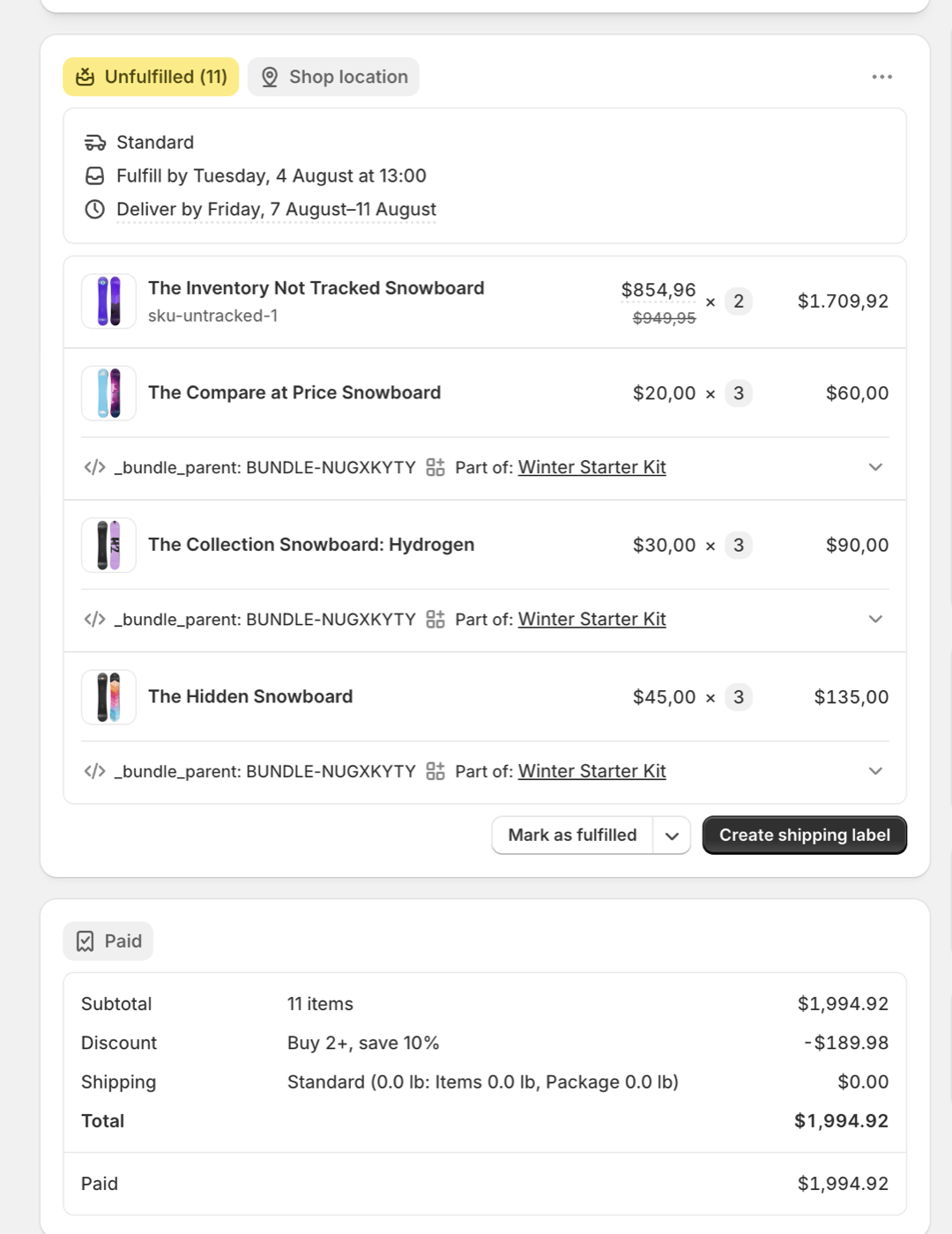
The moment an app expands a bundle determines how it fails. An app built on Shopify's Cart Transform API performs the expansion during checkout: Shopify constructs the order with the component line items already in it, so the components are in the order by construction, not added by an edit afterwards. That removes the post-order editing race entirely. There is no window where an order exists without its components, and no background job that must be alive to fix orders up after the fact. Orders placed while such an app was running keep their component lines permanently, whatever later happens to the app or its listing.
This is not a marketing render. Below is a real paid order produced by Solid Bundles: three kits expanded into component line items, each with its own SKU, quantity, price, and a reference back to the bundle it came from.
Two things a replacement should add, not just restore
If Rebolt's outage taught one lesson, it is that bundle apps fail silently: nothing warned anyone before offers went dark. A replacement should not just restore your bundles but make their correctness visible. That is the first pillar to look for: verification. Solid Bundles creates real test carts in every market you sell in and reports what customers will actually pay (totals, discounts, currency conversion) before a bundle goes live, in one click, so "is it still working?" has an answer that is not waiting for a customer email.
The second pillar is zero inventory writes. Solid Bundles computes kit availability live from your real component stock and has no write access to inventory at all. No sync job edits your counts, so no lagging, racing, or failed sync can ever corrupt them, and an uninstall leaves your inventory exactly as it was, a question you now know to ask.
How does the pricing compare?
Rebolt charged a flat $19.99 per month. The table shows only figures we have verified: Rebolt's flat price, Fast Bundle's tiering, and Solid Bundles' flat price.
| APP | PRICING MODEL | MONTHLY PRICE | REVENUE CAPS | AVAILABILITY |
|---|---|---|---|---|
| Rebolt | Flat | $19.99 | None published | Relisted after an unexplained removal; no public reason given |
| Fast Bundle | Tiered by bundle revenue | $19, then $49 / $139 | $19 tier caps at $1,000/mo bundle revenue | Relisted August 2026 after July 2026 security incident removal; reinstalls manual |
| Solid Bundles | Flat | $29 | No caps | Listed on the Shopify App Store |
LAST VERIFIED: AUGUST 2, 2026
What about the bundle analytics Rebolt included?
Rebolt's Pro plan advertised "A/B Testing & Advanced Analytics". A public review on its listing describes what that meant in practice: the analytics could not show how many of each bundle sold in a chosen period, only lifetime totals for the app as a whole, and the missing numbers were promised by support but never delivered. Whatever the dashboard did show, it lived in Rebolt's backend, so it went dark with everything else.
Here is the structural difference. An in-app analytics dashboard exists because the app's bundle data lives on the vendor's servers. Solid Bundles writes bundle orders the way Shopify itself models bundles: every component line item carries the order's standard bundle grouping. That is the same data Shopify's own bundle reports in Analytics are built on: Total sales by bundle, Total sales by bundle component, Bundle item versus non-bundle sales. Time-scoped, per bundle, per component, inside the reporting tool you already use, and the history stays in your store whatever happens to any app. There is no vendor dashboard to learn, and none to lose.
What is Solid Bundles?
Solid Bundles is Crescano's Shopify app for fixed bundles and quantity breaks, built for one thing: bundles serious operations can trust. It is built on Shopify's Cart Transform API, which is why the checkout-time expansion described above is not a feature toggle but the only way it works: real component SKUs land in every order by construction, and the app never writes to your inventory. Pricing is a flat $29 per month, with no revenue caps and no tiers, so a strong sales month never changes your bill. A built-in verification tool creates real test carts in every market you sell to and reports what customers will actually pay, which automates most of the replacement checklist above. The app is listed on the Shopify App Store. The setup guide, 3PL guide, and troubleshooting docs are public if you want to inspect the details first.
Solid Bundles is live on the Shopify App Store: $29 per month flat, no revenue caps, 14-day free trial. If Rebolt's outage left your bundles dark, you do not have to rebuild alone: send your bundle list and we handle the migration personally at no cost, usually within a day: email [email protected].
View on the App StoreMigrating off Fast Bundle instead? See Moving off Fast Bundle. Lost Stocky's kit assembly in the August 31 retirement? See Moving off Stocky. Comparing prices instead? See what bundle apps actually cost at your volume.