Solid Bundles creates fixed bundles and quantity breaks that stay correct all the way through your operations: the order your warehouse sees contains the real component SKUs, prices are right in every market currency, and you can verify all of it with one click before a campaign.
Migrating from another bundle app? See Moving off Fast Bundle or Moving off Rebolt.
Install the app
Install Solid Bundles from the Shopify App Store; the 14-day free trial starts when you install.
Create your first bundle (2 minutes)
- Open Solid Bundles from your admin's Apps menu.
- Click Create bundle.
- Add products and pick the component variants the bundle contains. Components keep their own SKUs in every order.
- Set a quantity per component and, optionally, a bundle price per unit. Leave the price blank to use the component's normal catalog price.
- Save & sync. The app creates the bundle product on your store, publishes it, and wires everything up.
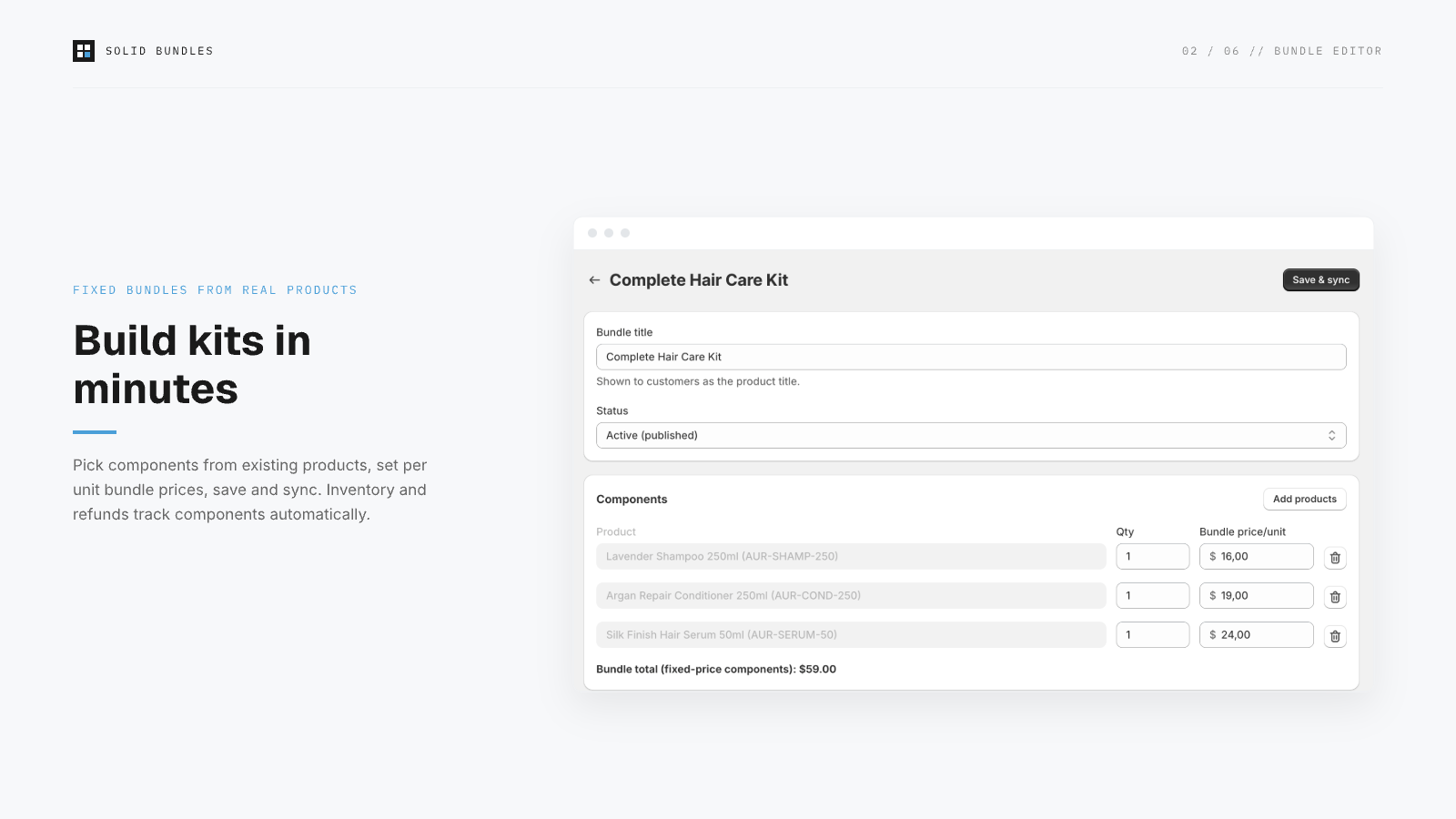
What customers see: a normal product page. What happens at checkout: the bundle expands into its components with your bundle pricing. What your 3PL sees: real SKUs and quantities on the order, nothing to translate, no missing items.
Show bundle contents on the product page
In the theme editor (Online Store → Customize, product template), click Add block → Apps → Bundle contents. The app's setup guide also gives you a one-click Open theme editor link that lands with the block preloaded. The block renders a "What's inside" list with quantities and prices, server-side, with no scripts and no layout shift.
Create quantity breaks
- Click Create quantity breaks.
- Pick the product the discount applies to.
- Add tiers, for example 2+ units at 10% off and 3+ units at 15% off.
- Save & sync. The app creates an automatic discount powered by Shopify Functions.
Add the Quantity breaks block to your product template the same way as above to show the tier table to customers.
Why percentages only? Fixed-amount discounts drift when currencies convert. That's the classic cause of "the discount was wrong at checkout" complaints. Percentages are correct in every currency by definition.
Let shoppers pick a shade or size inside a fixed kit
When a component product has variants, the bundle editor lets you choose which of them shoppers may pick. On the product page, the Bundle contents block then renders a selector (swatches for shades, a list for sizes) per component. Each chosen variant carries its own SKU into the order, so the pick list names the exact shade to pull, and a return restocks the exact variant that came back.
- Allow all variants of a component, or an explicit subset (exclude discontinued shades without touching the products).
- Components without variants simply render as a line item; you can mix both in one kit.
Build-a-box
- Click Create build-a-box.
- Pick the pool of eligible products, the number of picks you allow, and the percentage the finished box saves.
- Save & sync, then add the Build a box block to the box's product template.
The shopper assembles their set on the product page; at checkout the box expands into the picked components as real order lines, exactly like a fixed bundle. No committed stock, no mystery SKU in the warehouse.
Frequently bought together
Bought-together offers recommend companion products on a product page and discount them when bought with the anchor. Use them sparingly: they are an upsell garnish, not the core of the app, and every active offer consumes part of Shopify's per-store discount budget. The app enforces guard rails and warns before an offer would push cart sizes past Shopify's execution limits.
Verify before you promote
Run verification after your first bundle.
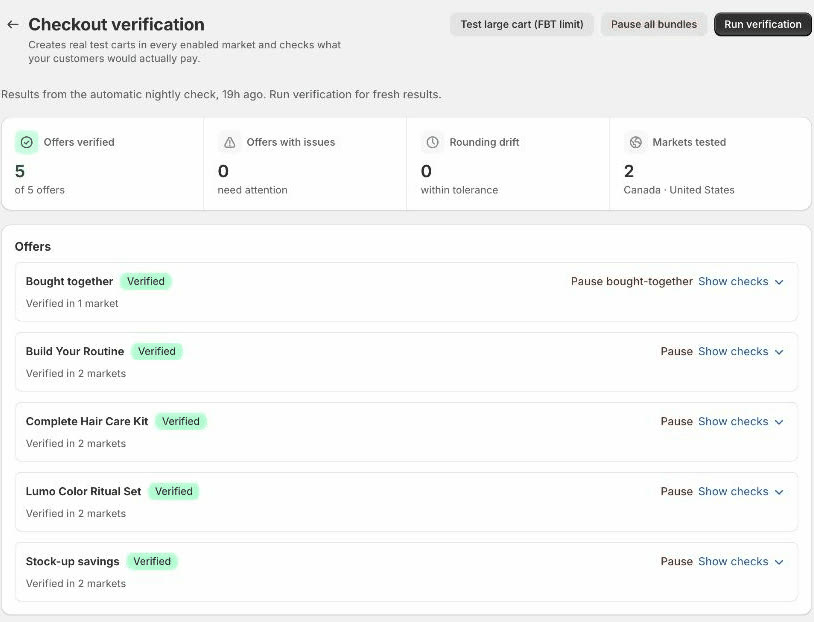
One click builds a real test cart in every market you sell to and confirms what customers will actually pay, before you promote anything. It catches most setup issues with a named failing check.
App → Verification → Run verification. The app creates real test carts in every market you have enabled and reports what a customer would actually pay: bundle totals, discount percentages, currency conversion, and configuration hazards like duplicate SKUs. Run it before every sale campaign.
You do not have to remember to run it: the same verification re-runs automatically every night for every store and every offer type, so drift from catalog changes or currency moves shows up in a report instead of a customer email. Each offer gets its own card with a plain-language Problem, the risk to customers right now, and a one-click fix; every offer also has one-click Pause / Resume, and there is a confirmation-gated Pause all bundles for emergencies.
Ask Sidekick about your bundles
Solid Bundles ships extensions for Shopify's Sidekick assistant. With the app installed, you can ask Sidekick, right in the admin: which offers are active and whether they passed verification last night, the full configuration of any bundle, how many complete sets you can still build from live component stock, and you can have it create a bundle you describe. Everything runs inside Shopify's permission model and is scoped to your store.
Good to know
- Discount visibility: Solid Bundles discounts appear already in the cart. Shopify's native automatic discounts often appear only at checkout. If you run both, don't be surprised when yours shows earlier.
- Cent rounding: percentage discounts round to the nearest cent per line, so an effective rate can read e.g. 9.95% on low-priced items. The rounding is Shopify's standard checkout behavior and favors consistency with your reports.
- Partial refunds: because components are real order lines, refunds target exactly the component and amount you choose, and bundle context stays attached for your support team.
- Styling: all widget styling lives in the theme editor, per block: layout, colors, status lines, the total-line text (with [pay] and [save] placeholders). What you see in the editor preview is what ships; there is no separate app styling page to drift out of sync.
- Multi-currency: discounts are percentage-based and computed after currency conversion, so set prices stay exact in every enabled market; verification proves it per market.
- Uninstalling: your configuration is kept for 48 hours after uninstall (accidental-uninstall protection), then purged automatically.
Install Solid Bundles, create a bundle, and place a test order. If the order does not show real component SKUs, you will know in minutes. Migrating? Email [email protected] and we will handle it personally.
View on the App Store